
FenSens Sensor/Backup Camera2.8.0 - App Store
You'll be able to see results in few seconds.
Publisher Description
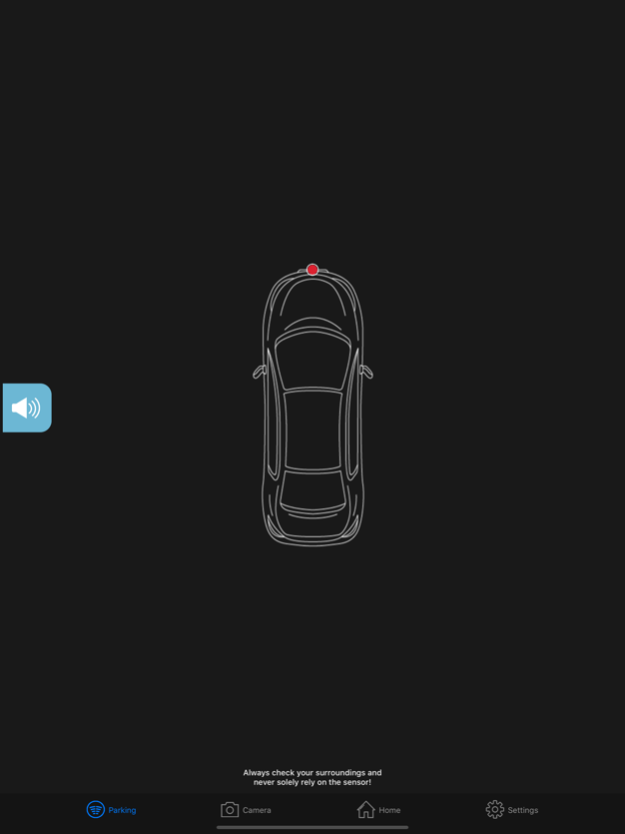
FenSens is the world's first smart wireless parking sensor or backup camera. The parking sensor or backup camera are an affordable solution that replaces your license plate frame and installs on your car in 5 minutes without any wiring or professional help needed. The included mobile app for iOS allows you to receive instant audio, visual, and vibration alerts right on your phone for the parking sensor or a live backup camera view with the backup camera (each product sold separately). A free included smartphone mount and TAP QuickLaunch button allow you to follow hands-free driving laws, launching the app and sensor readings in one second, without having to fumble around with your phone. FenSens makes parking a cinch and upgrades your vehicle with new car tech without breaking the bank!
(PATENT 9966951)
Features:
• The app instantly launches hands-free and allows you to easily access other connected car apps. Use with the included patent pending TAP QuickLaunch button to quickly launch the FenSens app, Maps, Pandora, Spotify, Roadside assistance, and more. Additional features coming soon.
•Included smartphone mount allows you to maintain “hands-free” phone app usage.
Parking Sensor Product:
• Ultrasonic parking sensors provide audio, visual, and vibration alerts on your app. Smart parking sensors mount on the front and/or back of your vehicle (Please sync accordingly to vehicle placement).
Backup Camera Product:
• Live 1080p HD viewing right on your phone!
Both Products Include:
•Weather-proof for long-lasting use in rain, snow, car washes, 140 Fahrenheit to -50 Fahrenheit.
•Completely wireless for simple installation, just screw in the FenSens license plate frame & sensors with the included custom anti-theft security screws.
•Battery operated (backup camera is recharged via solar power)
•Anti-theft features keep your device safe and prevents any non-registered users from using the device (making it completely useless to thieves).
• Available for iOS (4s + iOS7.1+ preferred)
• Bluetooth wireless 4.1
• More in-app features and compatible connected devices coming soon.
Please review and adhere to local license plate laws and if needed, slightly adjust vehicle registration stickers so that they are easily visible. Included in-app distance display is for visual display purposes only, the actual field of vision may vary. Please refer to the user manual for the exact field of vision and other helpful tips for getting this easy parking sensor setup the way you like. Always check your blind spots and never rely solely on the sensor or camera. Use your eyes and common sense. Check your blind spots, and park cautiously with this device, cameras, and any other backup safety product. Product comes with a one year hardware warranty.
Oct 1, 2020
Version 2.8.0
Camera V2 Support.
About FenSens Sensor/Backup Camera
The company that develops FenSens Sensor/Backup Camera is FenSens, Inc.. The latest version released by its developer is 2.8.0.
To install FenSens Sensor/Backup Camera on your iOS device, just click the green Continue To App button above to start the installation process. The app is listed on our website since 2020-10-01 and was downloaded 0 times. We have already checked if the download link is safe, however for your own protection we recommend that you scan the downloaded app with your antivirus. Your antivirus may detect the FenSens Sensor/Backup Camera as malware if the download link is broken.
How to install FenSens Sensor/Backup Camera on your iOS device:
- Click on the Continue To App button on our website. This will redirect you to the App Store.
- Once the FenSens Sensor/Backup Camera is shown in the iTunes listing of your iOS device, you can start its download and installation. Tap on the GET button to the right of the app to start downloading it.
- If you are not logged-in the iOS appstore app, you'll be prompted for your your Apple ID and/or password.
- After FenSens Sensor/Backup Camera is downloaded, you'll see an INSTALL button to the right. Tap on it to start the actual installation of the iOS app.
- Once installation is finished you can tap on the OPEN button to start it. Its icon will also be added to your device home screen.
Program Details
System requirements
Download information
Pricing
Version History
version 2.8.0
posted on 2020-10-01
Oct 1, 2020 Version 2.8.0
Camera V2 Support.
Disclaimer
Official App Store Link
We do not host FenSens Sensor/Backup Camera on our servers. We did not scan it for viruses, adware, spyware or other type of malware. This app is hosted by Apple and passed their terms and conditions to be listed there. We recommend caution when installing it.
The App Store link for FenSens Sensor/Backup Camera is provided to you by apps112.com without any warranties, representations or guarantees of any kind, so access it at your own risk.
If you have questions regarding this particular app contact the publisher directly. For questions about the functionalities of apps112.com contact us.
